Ansible is used for various types of Automations and use cases. Web Automation, Web Scraping and API Automation are some of them
when it comes to Web or API automation there are a lot of URLs and endpoints
Sometimes they respond immediately the first time, and sometimes you have to retry a few times or wait for them to return a specific status code or content
For example, when you are waiting for the health check URL to return a message OK
Or waiting for your Autosys Job be completed and return Completed Message
Or simply waiting for any application to come up and return a specific HTTP status code like 200 or 201 or 302 or any other
All of these use cases can be done and automated in Ansible. There are multiple ways to do it and let us explore some in this article
Ansible Wait for the URL to return status 200 status code
This is one of the most sought-after use cases in web automation.
As we all know the status 200 means the website is up and online and not just 200 we can look for any specific status code
here is the playbook that connects to the URL and waits for it to return status 200
---
- name: Playbook for Web automation
  hosts: localhost
  tasks:
  - name: Check if devopsjunction.com is available and returning status 200
    uri:
      url: https://devopsjunction.com
    register: result
    until: "result.status == 200"
    retries: 5
    delay: 10
In this playbook, we have one play and one task with the module uri
We are connecting to the url https://devopsjunction.com and waiting for the response to be 200,
This is done using ansible retry until feature. I wrote an exclusive article on until you can check
If at the first time it does not respond with status 200 it keeps trying until it gets 200 as a response for the number of times defined in retries with the interval defined in delay in seconds.
In our case, we try 5 times with a delay of 10 seconds before it returns a failure
Here is the execution output of this playbook, I have added -vv more little extra verbose output
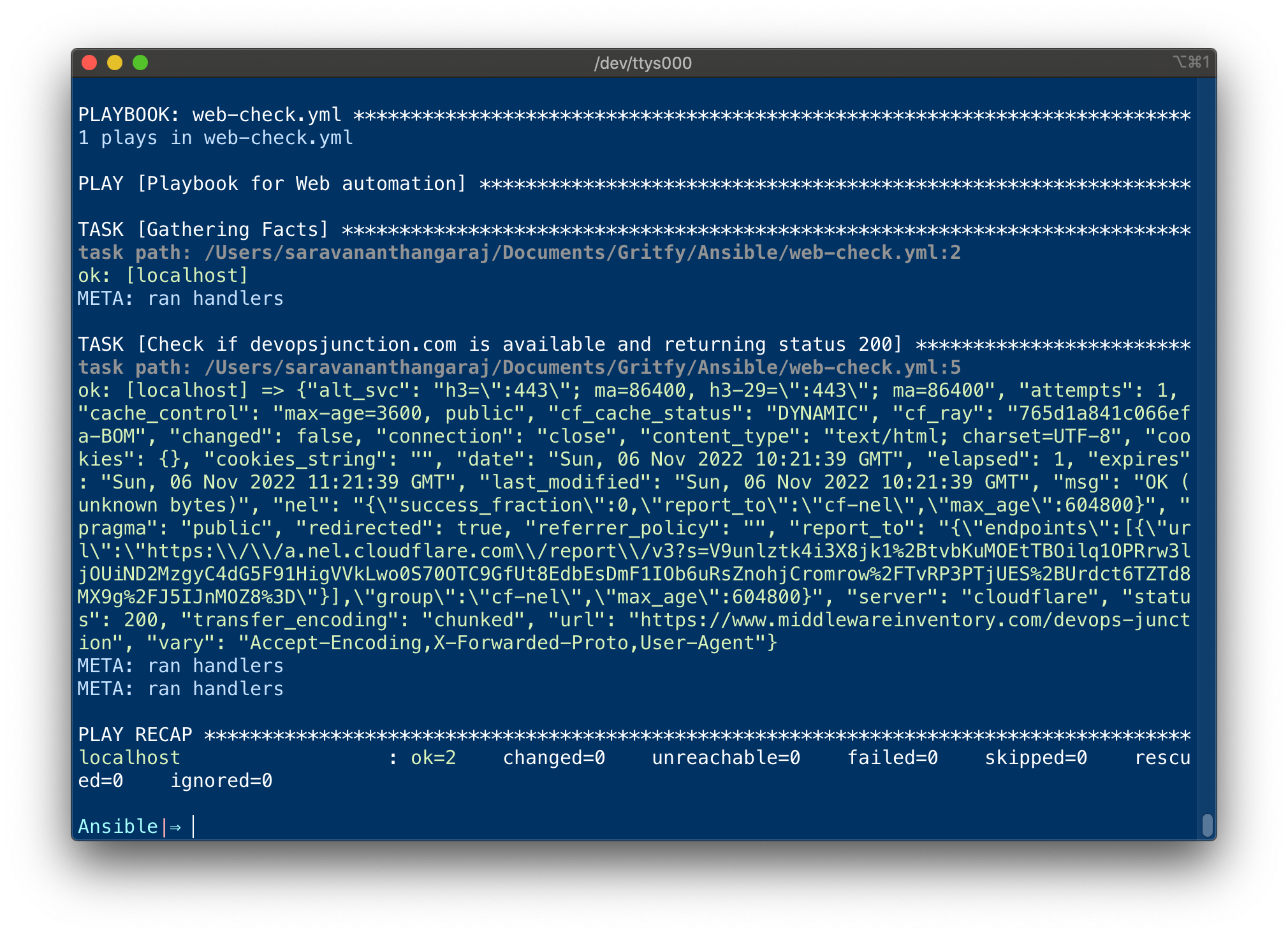
You can modify the playbook to any other status code too, as per your requirement
All you have to do is to update the until condition, in our case, our condition is to check if the result.status variable is equal to 200 ( string comparison)
until: "result.status == 200"
here is one more example where we are looking for status code 201 for the API endpoint
Ansible wait for POST call to return 201 status code - API
For this example, I am using the publically available test API platform https://reqres.in/
In this example, we are going to send a payload to the API endpoint over the HTTP POST method and wait for it to return the 201 status code
Here is the playbook
---
- name: Playbook for Web automation
  hosts: localhost
  tasks:
  - name: Wait for API endpoint to return 201 created
    uri:
      url: https://reqres.in/api/users
      method: POST
      body: |-
        {
          "name": "Sarav",
          "job": "leader"
        }
      return_content: yes
      status_code: 201
    register: result
    until: "result.status == 201"
    retries: 5
    delay: 10

  - debug: var=result.content
You can try this playbook as it is, as this is a publically available API
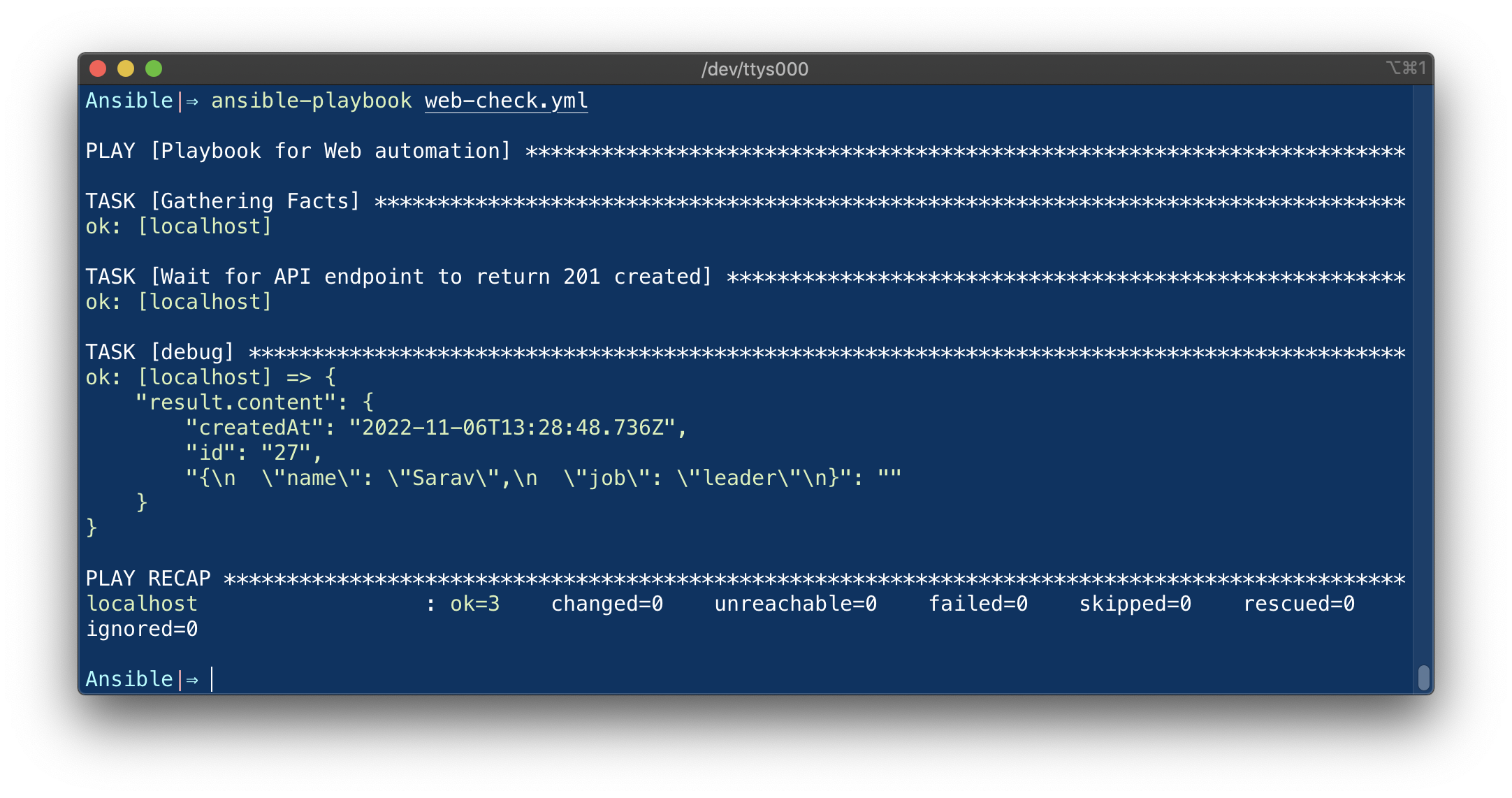
You can see that we are making an HTTP POST request with a Payload in body to the API endpoint and waiting for the status code 201.
This endpoint creates a new user and returns a JSON of the newly created user
We have updated our until condition to look for 201 text in the result variable. if not it would retry the specified no of times before failing
until: "result.status == 201"
Ansible wait for a message or specific string in response
Unlike the last two examples where we looked for the HTTP status code of our request, in this example, we are going to see how to wait for a specific string or message in the response
We are going to use the same reqres.in API we have used earlier but different endpoint or URL
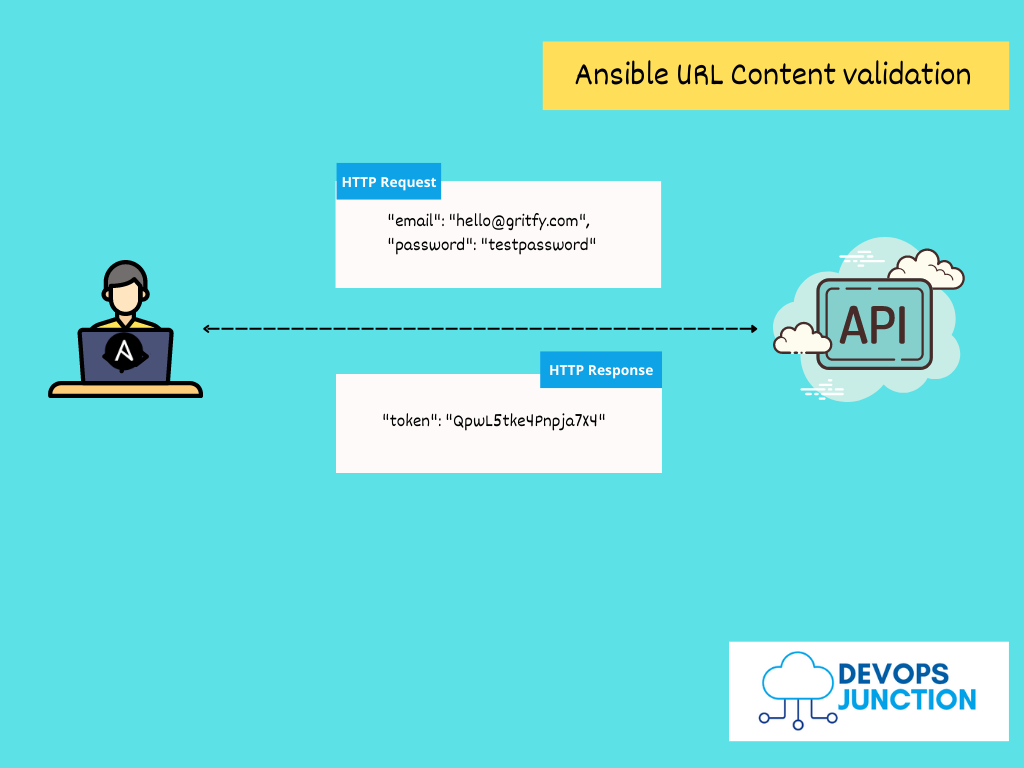
For the login API to work you need to pass the username and password as JSON over HTTP POST to the remote URL `https://reqres.in/api/login`
Now here is the playbook where we pass the JSON data of email and password to the login API
---
- name: Playbook for Web automation
  hosts: localhost
  tasks:
  - name: Wait for API endpoint to return a specific message response
    uri:
      url: https://reqres.in/api/login
      method: POST
      body_format: json
      body: |-
        {
          "email": "[email protected]",
          "password": "cityslicka"
        }
      return_content: yes
    register: result
    until: "'token' in result.content"
    retries: 2
    delay: 10

  - debug: var=result.content
As per the API documentation, only the following email and password combination would let you log in or Succeed. Let us first try it and see the response.
{
  "email": "[email protected]",
  "password": "cityslicka"
}
Since our credentials are valid we should get a token and ansible looking for the token string/text in the response would also succeed
Here is the execution and the response with the correct user credentials.
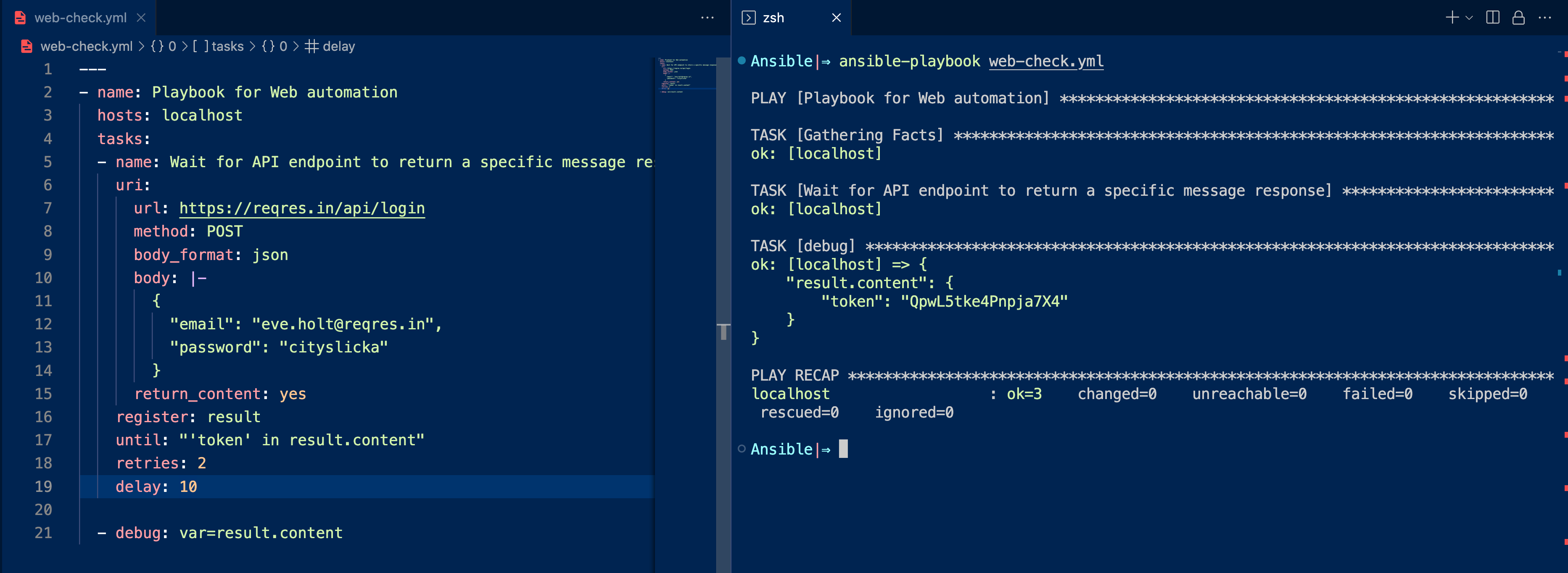
In the preceding screenshot, You can see the response has the token on the ansible-playbook output shown on the right
Let us modify the email ID to something else and try to log in, it should fail or not allow us to login
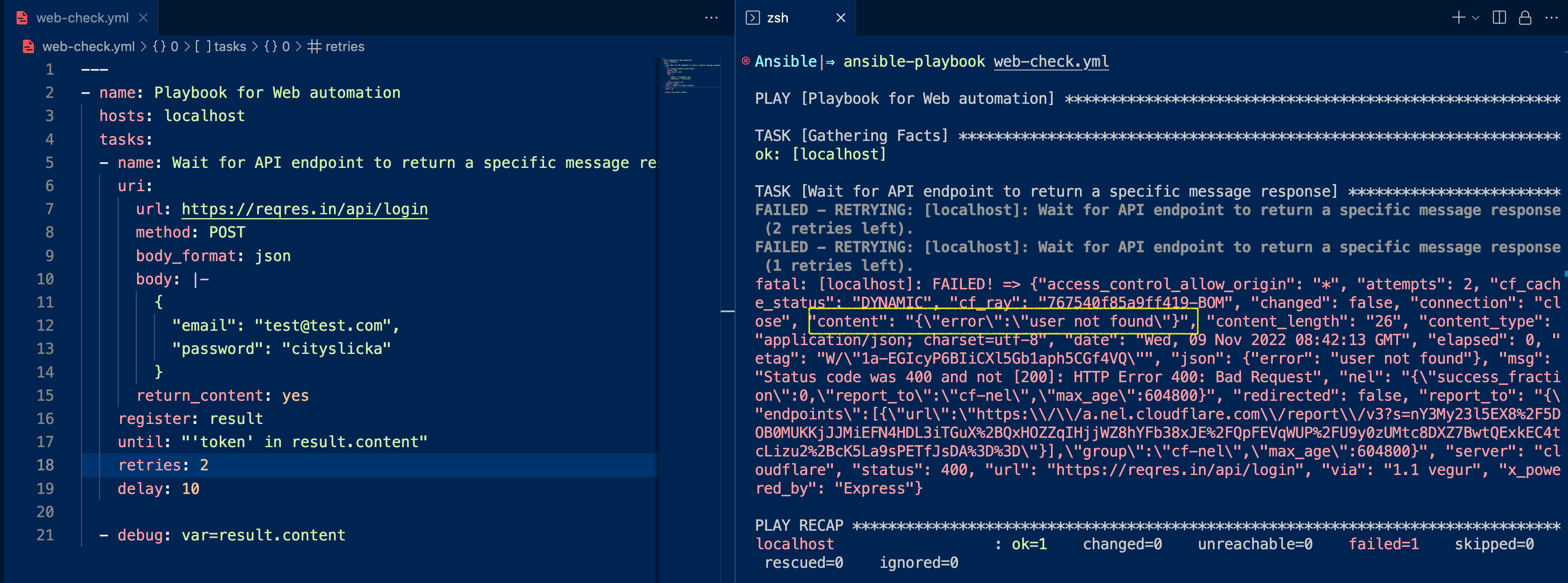
As shown in the preceding image, you can see that we have updated the username to [email protected] when retried, it threw an error user not found after two retries
Remember in ideal scenarios we do not retry if the login fails with some credentials, Your account would be locked, this example is just to show you how message/text validation works with ansible url retry
Where to go from here
we have seen how to connect to a URL or API endpoint and validate the response status code or content and retry until the requirement is met.
We have used the following modules and features of Ansible to get this done.
- URI module - For connecting to API and WEB URLs
- retry until - to validate and retry until a condition is met
we have an exclusive article on these subjects for you to read
Ansible Retry Examples – Retry a task until condition met | DevopsJunction
There is one more way to connect to the remote URL to make sure that it works. it is done using wait_for module
You can find more on the wait_for module here
Hope this helps, Let me know if you have any questions on the comments section
Cheers
Sarav AK

Follow me on Linkedin My Profile Follow DevopsJunction onFacebook orTwitter For more practical videos and tutorials. Subscribe to our channel

Signup for Exclusive "Subscriber-only" Content