
As you all know I have been working on this AI and Data Space for a while now and I have seen various bottlenecks and complexities in the data engineering and augmentation layer - at both startup and large enterprise clients
When you think of where to use AI or get value out of AI - the first and most prominent idea that comes is, why not build a centralized AI powered knowledge management system - It could be a simple RAG based system or a complex knowledge graph
But it all starts like this
- Data Source identification
- Data Augmentation
- Data Transformation to Vectors/Graphs
- Building Intelligent ChatBots / Consumers on top
While we cannot solve the entire data engineering pipeline problems and sources ( at least not yet )
I wanted to build an accelerator for one of the source at the least.
when I say source, Most of the enterprise knowledge are stored in form of articles, journals, workbooks, SOPs etc etc and when it comes to specific domains like BFSI there are tons of documents like claims, rulebooks, forms etc.
I thought why not we solve the Data Augmentation and AI readiness problem for PDFs ?
Thats when I decided to build PDFstract.
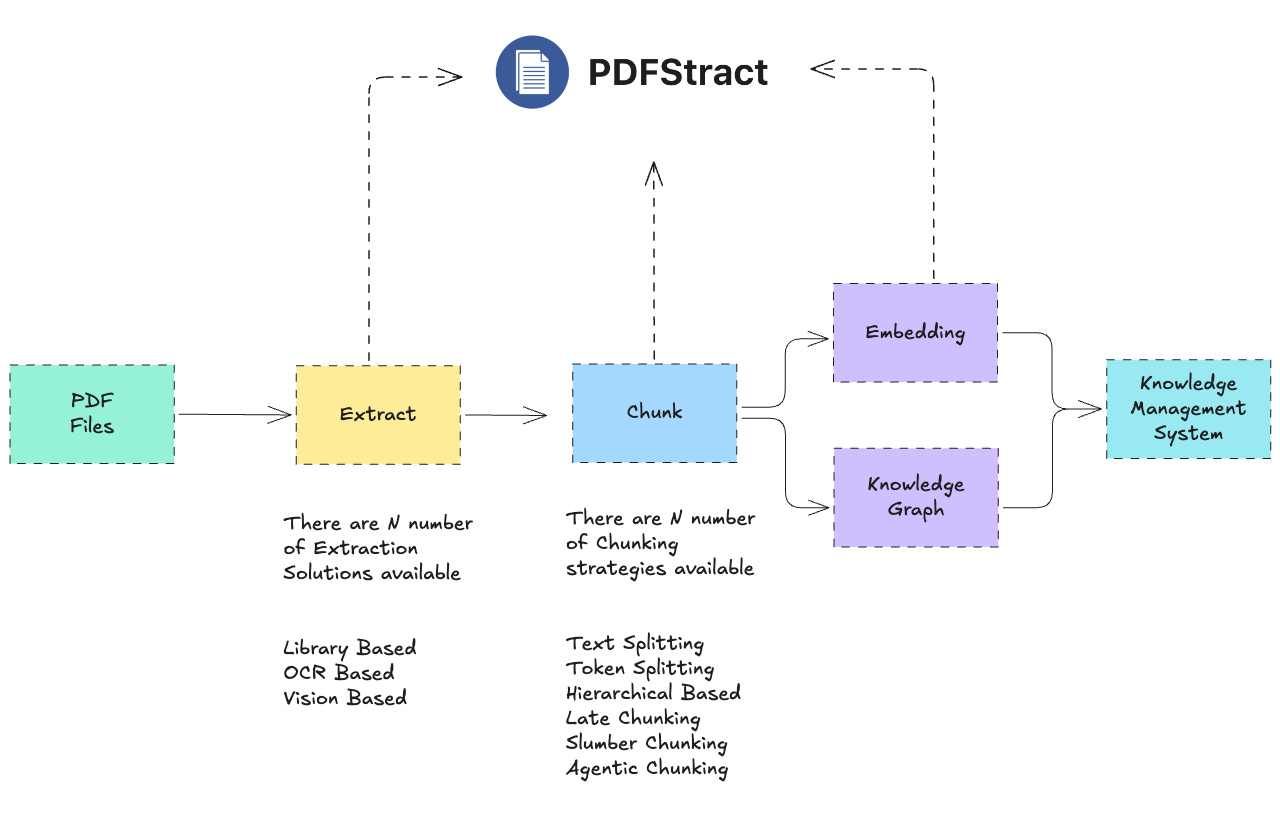
PDFstract is a framework available as a CLI, Python Module and Web UI to unify the PDF ingestion for the AI Knowledge management and RAG systems
Modern RAG and LLM systems depend on clean document ingestion.
But PDF extraction is fragmented:
- Some libraries work better for structured reports
- Others perform better on scanned or OCR-heavy documents
- Output formats vary widely
- Chunking strategies significantly impact retrieval performance
Teams often waste hours testing combinations manually.
PDFStract provides:
- A unified abstraction over multiple PDF extractors
- Standardized output formats (markdown, json, text)
- Built-in chunking strategies for RAG pipelines
- Easy benchmarking and comparison between libraries
It becomes the standardized ingestion layer of your AI data pipeline.
Get started in two lines
from pdfstract import PDFStract
ps=PDFStract()

# convert and chunk in a single step with auto mode
chunks=ps.convert_chunk("path/to/pdf", library="auto", chunker="auto")

# or do it in two steps
# convert first with your library of choice
md_content=ps.convert("path/to/pdf", library="docling")

# chunk with your chunking technique of choice
# Chunk the text
chunks = pdfstract.chunk(text, chunker='token' chunk_size=512, chunk_overlap=50)
What Makes PDFStract Different?
Instead of committing to a single PDF extraction library, PDFStract lets you:
- Swap extractors with one parameter
- Benchmark multiple libraries on the same document
- Automate library selection
- Standardize downstream processing
- Keep your ingestion layer future-proof
As new extraction libraries emerge, PDFStract allows you to integrate them without rewriting your pipeline
PDFStract decouples your ingestion layer from any single extraction library.
Installation and Usage
Choose based on required extraction libraries.
pip install pdfstract
pip install pdfstract[standard]
pip install pdfstract[advanced]
pip install pdfstract[all]
CLI Usage
# List available libraries
pdfstract libs

# List available chunkers
pdfstract chunkers

# Convert a single PDF
pdfstract convert document.pdf – library pymupdf4llm – output result.md

# Convert and chunk in one command
pdfstract convert-chunk document.pdf – library pymupdf4llm – chunker semantic – output chunks.json

# Chunk an existing text file
pdfstract chunk document.md – chunker token – chunk-size 512 – output chunks.json

# Compare multiple libraries on one PDF
pdfstract compare sample.pdf -l pymupdf4llm -l marker -l docling – output ./comparison

# Batch convert 100+ PDFs in parallel
pdfstract batch ./documents – library pymupdf4llm – output ./converted – parallel 4

# Download models for a specific library
pdfstract download marker
Module Usage with Python
You don't need to use the CLI! PDFStract can be easily integrated into your Python applications as a library.
Convert a PDF (One-liner)
from pdfstract import convert_pdf

# Quick conversion with default settings
result = convert_pdf('sample.pdf', library='marker')
print(result)  # Markdown content
List Available Libraries
from pdfstract import PDFStract

pdfstract = PDFStract()

# Get list of available libraries
available = pdfstract.list_available_libraries()
print(available)  # ['pymupdf4llm', 'marker', 'docling', ...]
Structured Conversion
from pdfstract import PDFStract

pdfstract = PDFStract()

# Convert with options
result = pdfstract.convert(
    pdf_path='document.pdf',
    library='marker',
    output_format='markdown'  # or 'json', 'text'
)
Batch Processing Multiple PDFs
from pdfstract import PDFStract

pdfstract = PDFStract()

# Convert all PDFs in a directory in parallel
results = pdfstract.batch_convert(
    pdf_directory='./pdfs',
    library='pymupdf4llm',
    output_format='markdown',
    parallel_workers=4
)

print(f"✓ Success: {results['success']}")
print(f"✗ Failed: {results['failed']}")
Async Conversion (for Web Apps)
import asyncio
from pdfstract import PDFStract

async def process_pdfs():
    pdfstract = PDFStract()
    result = await pdfstract.convert_async(
        'document.pdf',
        library='docling',
        output_format='json'
    )
    return result

# Use in FastAPI, asyncio, etc.
asyncio.run(process_pdfs())
Text Chunking for RAG Pipelines
from pdfstract import PDFStract

pdfstract = PDFStract()

# 1. Extract PDF
text = pdfstract.convert('document.pdf', library='docling')

# 2. Chunk the text
chunks = pdfstract.chunk(
    text=text,
    chunker='semantic',  # or 'token', 'sentence', 'code', etc.
    chunk_size=512
)

print(f"Created {chunks['total_chunks']} chunks")

# 3. Process chunks for embedding/indexing
for chunk in chunks['chunks']:
    print(f"- {chunk['text'][:50]}... ({chunk['token_count']} tokens)")
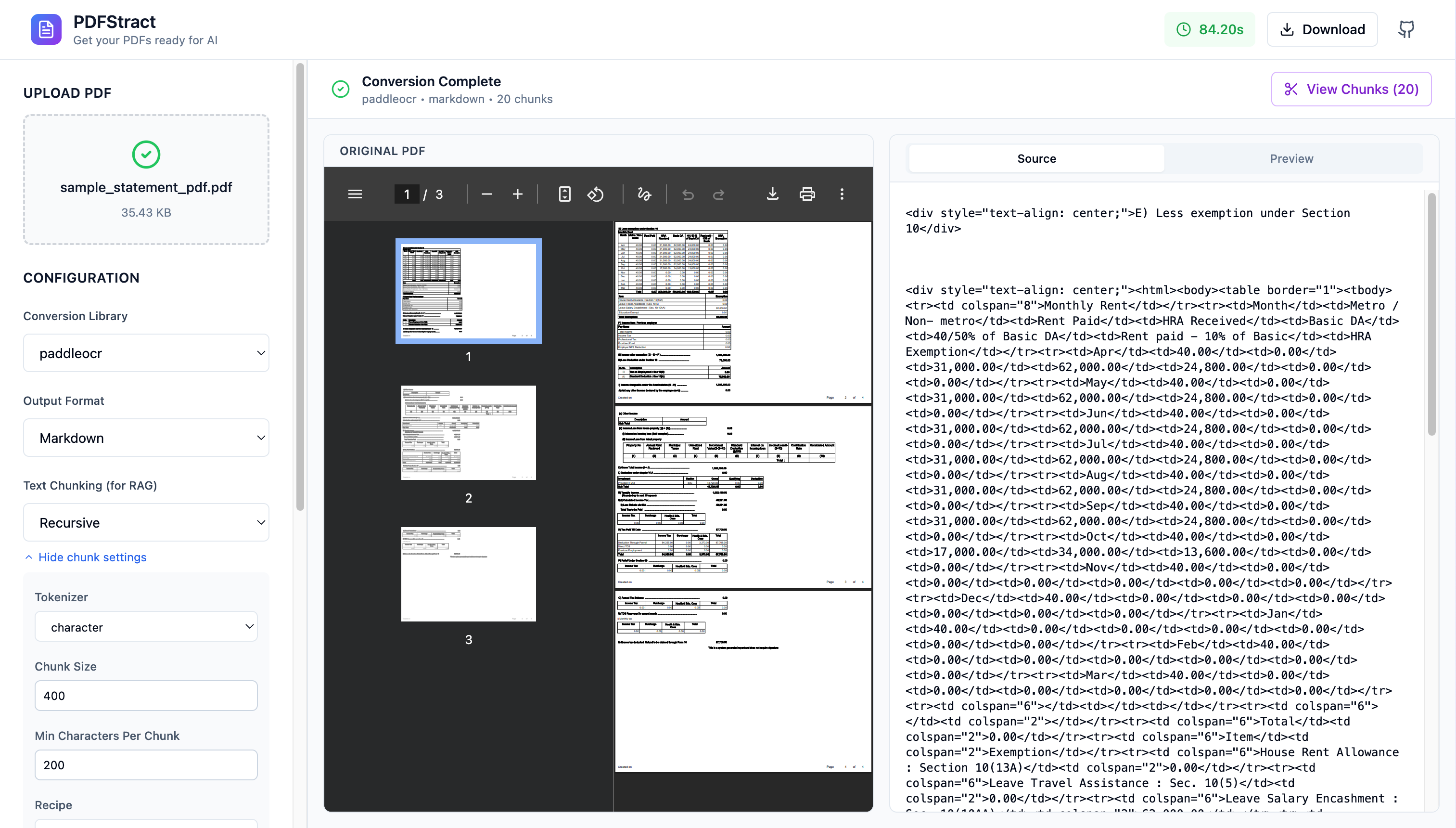
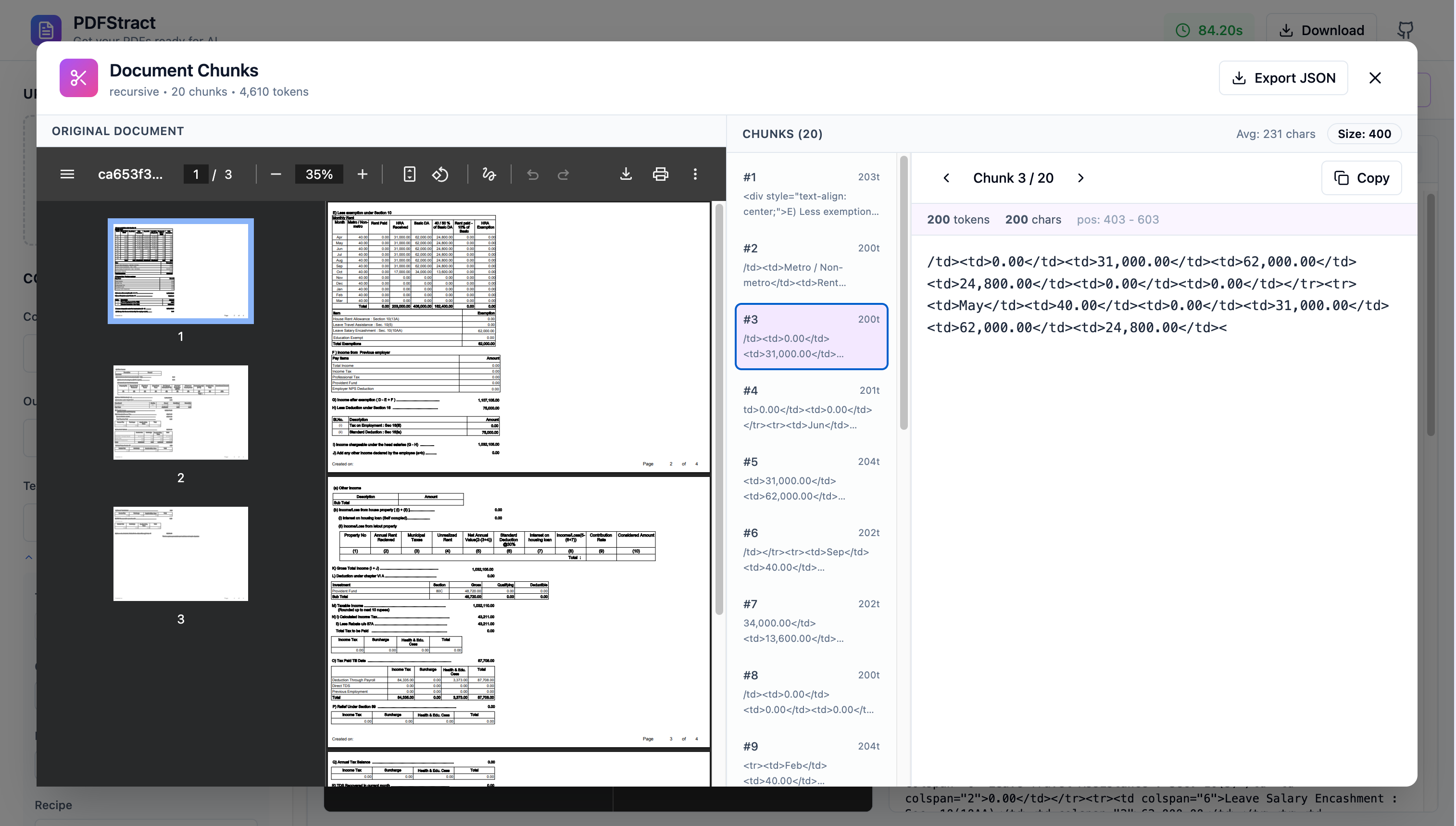
Powerful Web UI
# Clone the repository
git clone https://github.com/aksarav/pdfstract.git
cd pdfstract

# Download models and start services (first time)
make up

# Or step by step:
make models   # Download HuggingFace/MinerU models (~10GB)
make build    # Build Docker images
make up       # Start services
What is next
- Embedding layer
- Graph Extraction Layer for Knowledge Graph
- In built RAG support for Intelligence powered by LanceDB
- UI updates and customisation and much more.
Please do feel free to share your thoughts and support and star the repository if you find it helpful.
Until next post.